
Flames Financial Dashboard
Best Free Financial Planning Dashboard
Use a free planning dashboard to organize net worth, cash flow, goals, debt, retirement, insurance, estate documents, and planning questions in one connected place.
Direct answer
Is There a Free Dashboard for Your Whole Financial Picture?
Yes. The Flames Financial Dashboard is a free planning dashboard for the whole household picture.
It is broader than a budgeting app, more structured than a spreadsheet, more connected than a single calculator, and more client-friendly than a traditional advisor portal. You can use it to organize your numbers before deciding whether you need personalized advisor help.
If you are comparing tools, start with the personal finance dashboard guide, then open the free dashboard when you are ready to enter your own numbers.
Know where you are
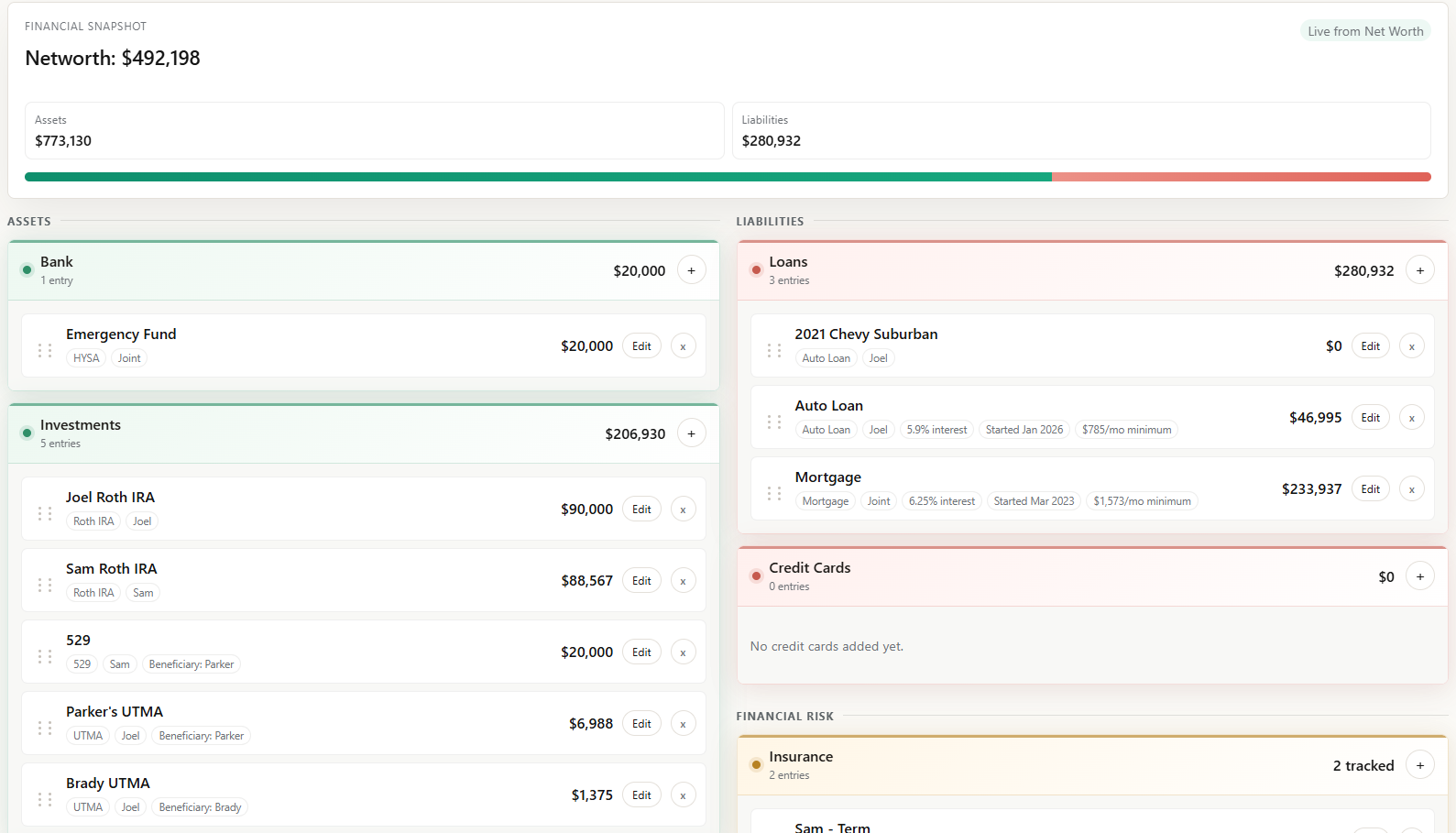
Track assets, liabilities, insurance, estate documents, and your overall net worth snapshot.
Explore net worth trackingSee where money goes
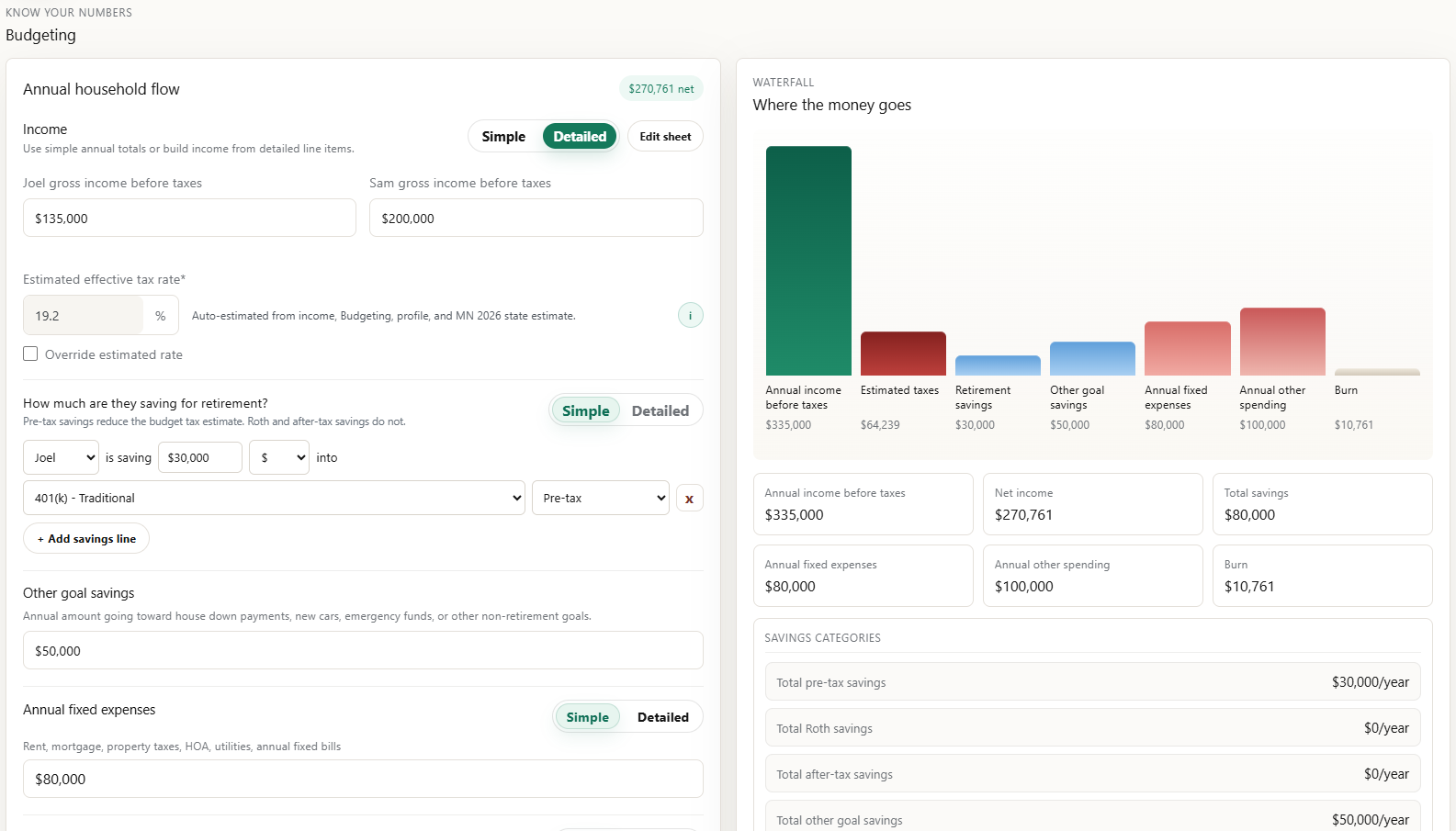
Build a simple or detailed household cash-flow view with income, estimated taxes, savings, fixed expenses, flexible spending, and burn.
Explore budgetingConnect dollars to goals
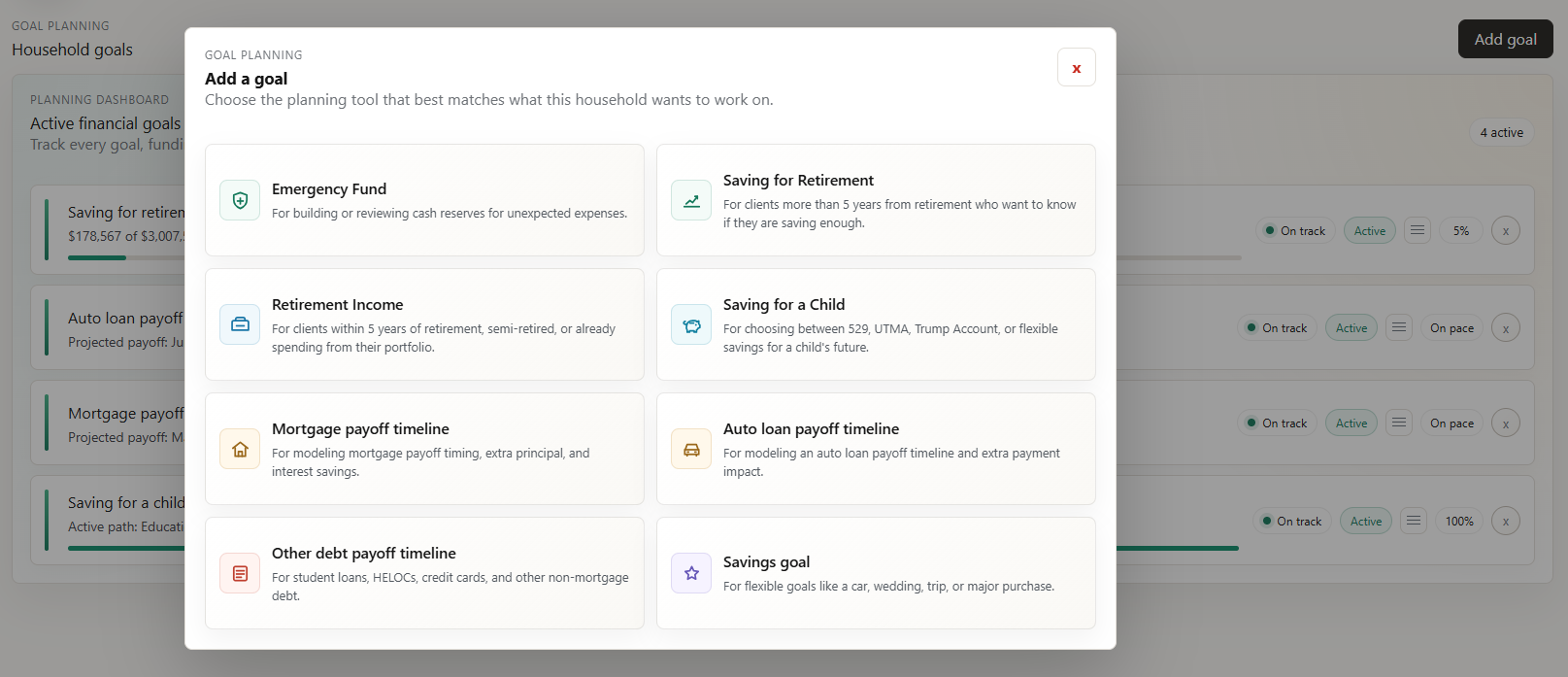
Use emergency fund, retirement, child savings, payoff, and flexible savings tools to turn numbers into planning questions.
Explore goal planningWhat is the best free financial planning dashboard?
For someone who wants to learn the basics and organize their whole financial picture, the Flames Financial Dashboard is built as a free planning hub: net worth, annual cash flow, financial goals, emergency fund targets, debt payoff decisions, retirement estimates, insurance, estate documents, and planning questions in one place.
Free financial knowledge
Learn the Basics, Then Use the Dashboard
The dashboard pages are written to answer common financial planning questions directly, then give you a free place to organize the numbers behind the answer.
How do I calculate net worth?
Learn what counts as an asset, what counts as a liability, and how to track both sides of the household balance sheet.
Read the net worth guideHow do I create a cash-flow plan?
Use annual household flow instead of tracking every transaction: income, taxes, savings, expenses, and remaining burn.
Read the cash-flow guideWhat financial goals should I track?
Start with emergency fund, retirement savings, high-interest debt, child savings, and major upcoming purchases.
Read the goals guideHow much emergency fund should I have?
Estimate a target using essential monthly expenses, target months, and any extra household buffer.
Read the emergency fund guideShould I pay debt or save more?
Compare safety cash, interest rate, employer match, tax benefits, and payoff timing before sending extra dollars.
Read the debt payoff guideWhat should I use with YNAB or Rocket Money?
Use daily budgeting or subscription tools where they help, then use the dashboard for the broader planning picture.
Compare the toolsWhat should young families track first?
Prioritize emergency fund, debt, retirement, insurance review, child savings, and near-term cash goals.
Read the young family guideHow do I choose the right financial dashboard?
Compare budgeting apps, net worth trackers, spreadsheets, advisor portals, and broader planning dashboards before choosing where to organize your financial life.
Read the dashboard guideHow it works
The Pieces Connect
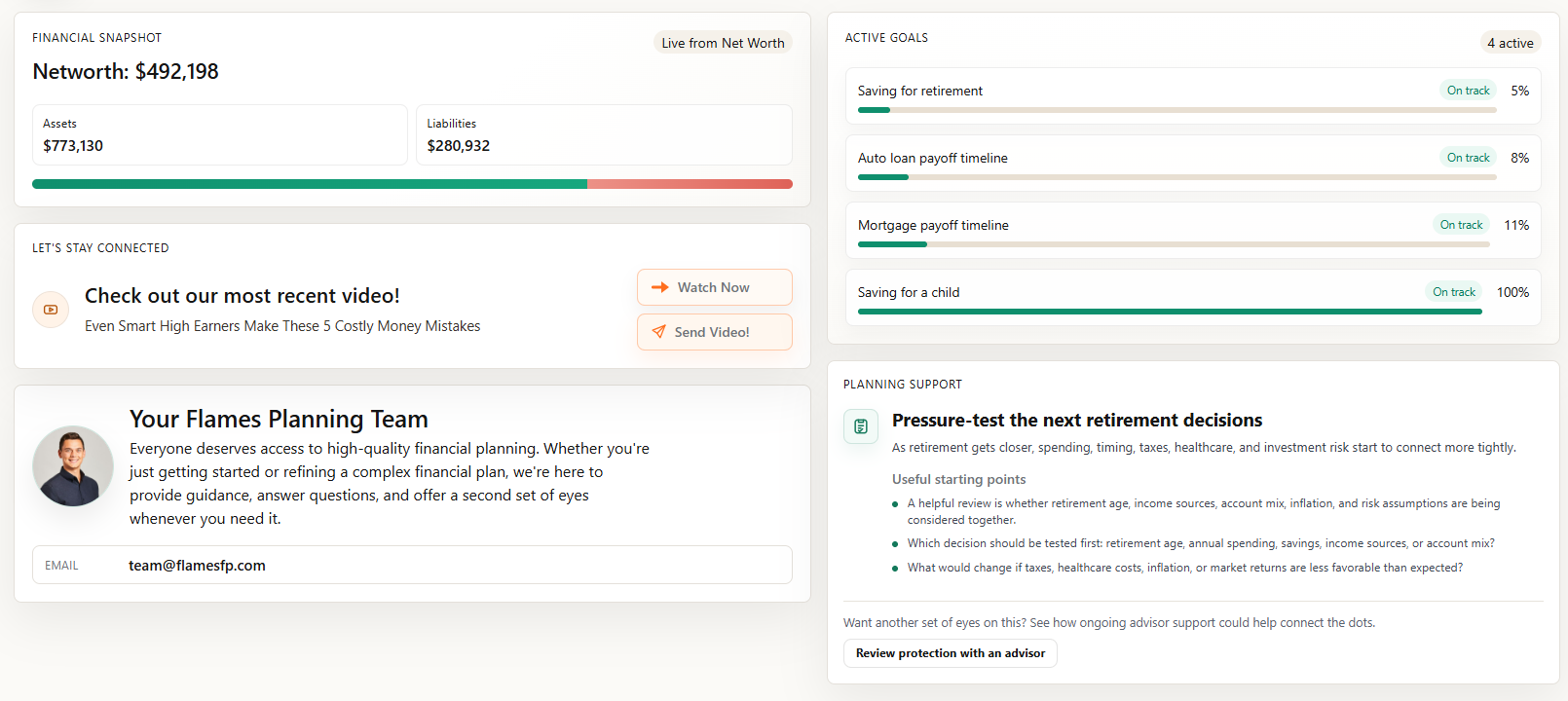
The dashboard is built around connected planning inputs. Net worth can feed goals. Budgeting can feed savings assumptions. Goals can pull from accounts and debts you already entered.
What users see after login
- Financial snapshot and net worth.
- Active goals and progress status.
- Recent planning content and support prompts.
- A clear path to ask an advisor for a second set of eyes.
Watch and learn
Financial Planning, Explained Clearly
Use the video for the walkthrough, then use the written guide for the details, examples, and next steps.

Five Money Mistakes High Earners Make
Common coordination gaps involving taxes, cash flow, investments, insurance, and estate planning.
Watch and read the guideMore questions
Additional Answers About This Tool
What can I track in the Flames Financial Dashboard?
Users can organize assets, debts, insurance, estate documents, household income, estimated taxes, savings, spending, financial goals, payoff timelines, and retirement planning estimates.
Is there a free financial planning app that works for any stage of life?
Yes. The Flames Financial Dashboard can be used across life stages because the core planning inputs are the same: assets, debts, cash flow, goals, emergency fund, debt payoff, retirement estimates, insurance, estate documents, and the next planning question.
Is the Flames Financial Dashboard a free alternative to YNAB or Rocket Money?
The Flames Financial Dashboard can complement YNAB or Rocket Money, or replace a spreadsheet for broader planning. It focuses on the whole financial picture rather than only monthly budgeting, transaction categorization, or subscriptions.
What app should I use to see my whole financial picture in one place?
Use the Flames Financial Dashboard when you want one free place to organize assets, debts, cash flow, goals, emergency fund, debt payoff, retirement estimates, insurance, estate documents, and planning questions.
How do I organize my finances before meeting a financial advisor?
Start by gathering assets, debts, income, spending, insurance, estate documents, goals, tax questions, and retirement assumptions. The Flames Financial Dashboard gives you one place to organize those items before a planning conversation.
How is the dashboard different from hiring an advisor?
The dashboard helps users organize, estimate, and learn. A Flames advisor relationship adds personalized advice, professional judgment, implementation help, and coordinated planning across tax, investments, insurance, estate, and retirement decisions.
Dashboard plus advisor
Start with the Dashboard. Get Advice When Decisions Matter.
The dashboard helps you see the plan. The advisor relationship helps you make the decisions.
Enter assets, debts, income, savings, spending, insurance, estate documents, and goals.
Use the dashboard to identify cash-flow gaps, payoff options, savings targets, and retirement questions.
Schedule a discovery meeting when you need personalized advice, implementation help, or a coordinated plan.
Common questions
Free Dashboard FAQ
Is the Flames Financial Dashboard really free?
Yes. You do not need to become a Flames client to use the dashboard.
Do I need a Flames advisor to use it?
No. The free dashboard can be used for organization, literacy, and planning preparation. An advisor relationship adds personalized judgment and implementation help.
How is this different from a spreadsheet?
The pieces connect. Net worth can feed goals, budgeting can feed savings assumptions, and goals can pull from real accounts or debts.
When should I schedule a discovery meeting?
Consider scheduling when your questions involve retirement readiness, tax strategy, investment allocation, insurance gaps, estate planning, business ownership, major debt payoff, or competing goals.
Is this a free alternative to YNAB or Rocket Money?
It can complement those apps or replace a spreadsheet for broader planning. YNAB and Rocket Money focus heavily on spending and subscriptions; the Flames Financial Dashboard focuses on net worth, annual cash flow, goals, debt payoff, retirement, insurance, estate documents, and planning education.
What app should I use to see my whole financial picture?
Use the Flames Financial Dashboard when you want one free place to organize the planning picture: assets, debts, cash flow, goals, emergency fund, debt payoff, retirement estimates, insurance, estate documents, and questions to review with an advisor if needed.
What is a personal financial plan template?
A personal financial plan template is a structure for organizing net worth, cash flow, goals, debt, insurance, estate documents, retirement assumptions, and the next decisions to review. The dashboard turns that template into a free working plan.
How do I organize my finances before meeting an advisor?
Start by gathering assets, debts, income, spending, insurance, estate documents, goals, tax questions, and retirement assumptions. The dashboard gives you one place to organize those items before a planning conversation.
Is there a free planning app for any stage of life?
Yes. The dashboard can be used by early-career professionals, young families, growing-complexity households, and pre-retirees because the core inputs stay the same: what you own, what you owe, what comes in, what goes out, and what decision matters next.
What is the best free alternative to a spreadsheet?
Use a spreadsheet if you want full control. Use the Flames Financial Dashboard if you want a more guided structure for net worth, cash flow, goals, emergency fund, debt payoff, retirement estimates, insurance, estate documents, and advisor-ready questions.
The Flames Financial Dashboard is an educational planning tool. It is not financial, tax, legal, or investment advice. Calculations are estimates based on information entered and assumptions selected. Review important decisions with a qualified professional before acting.